

 Home
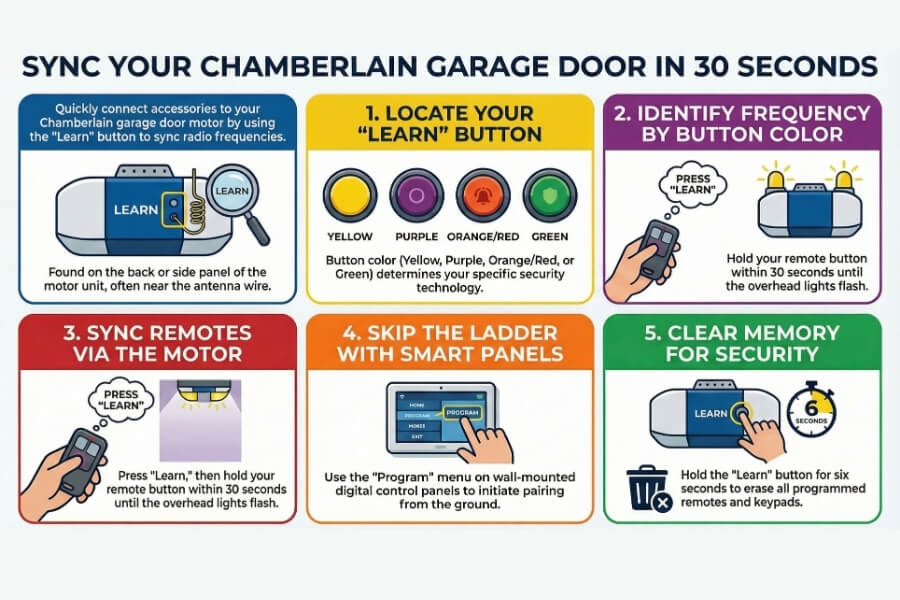
HomeA functioning remote or keypad is essential for getting the most out of your home’s access system. Whether you are replacing a lost clicker, adding a new exterior keypad, or just moving into a new home, you will need to know exactly how to sync Chamberlain garage door opener systems. To successfully complete this process, press and release the “Learn” button on your motor. Within 30 seconds, hold the remote button or enter your 4-digit PIN on the keypad until the overhead lights flash. This connects your accessories to the motor’s specific radio frequency. If you have a brand new garage door opener but need help installing and setting it up, give us a call! As part of garage door opener installing service, we help set everything up for you!
Where is the Learn Button on my Garage Door Motor?
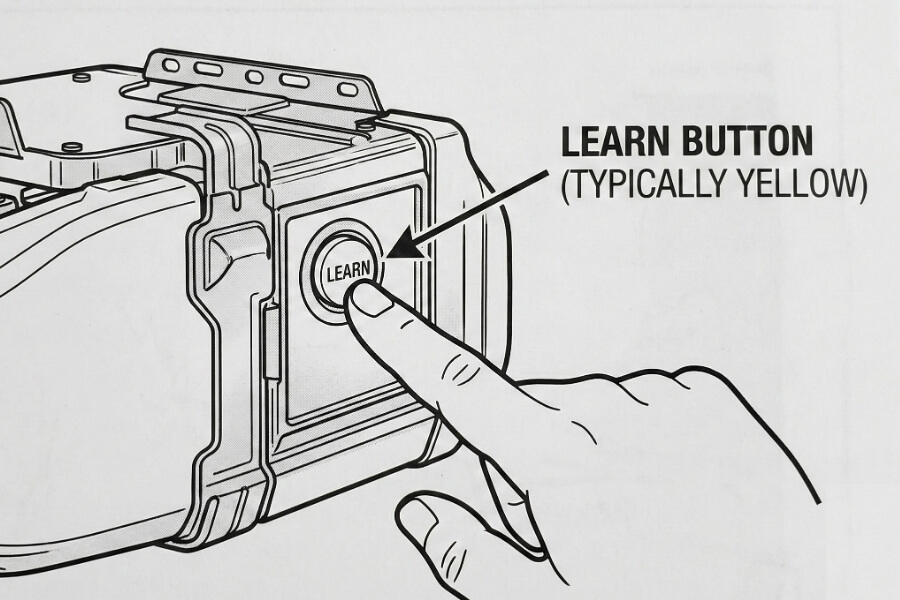
Before you can begin any wireless keypad setup, you must identify the control center of your overhead unit. Most Chamberlain models house this button on the back or side panel near the antenna wire. You might need to swing open the plastic light cover to see it clearly.
The color of this button is the most important detail because it dictates the frequency your system uses. Use the table below to identify your specific technology before buying replacement parts.
| Button Color | Radio Frequency | Security Technology |
| Yellow | 310, 315, 390 MHz | Security+ 2.0 (Tri-band) |
| Purple | 315 MHz | Security+ Rolling Code |
| Orange / Red | 390 MHz | Security+ Rolling Code |
| Green | 390 MHz | Billion Code (Older Models) |
How do I Program a Chamberlain Remote?
Programming a handheld clicker is a simple task that requires no tools other than a sturdy ladder. When you prepare to sync Chamberlain garage door opener remotes, we recommend moving your car out of the garage before you start. This prevents the door from accidentally hitting your vehicle if it activates during the setup.
- Climb the ladder to reach the motor unit on your ceiling.
- Press and immediately release the Learn button (do not hold it down).
- Wait for the small LED indicator next to the button to glow steadily.
- Press and hold the button on your handheld remote within the next 30 seconds.
- Let go of the button once the garage light bulbs blink or you hear two clicks.
Can I Program a Remote Without Using a Ladder?
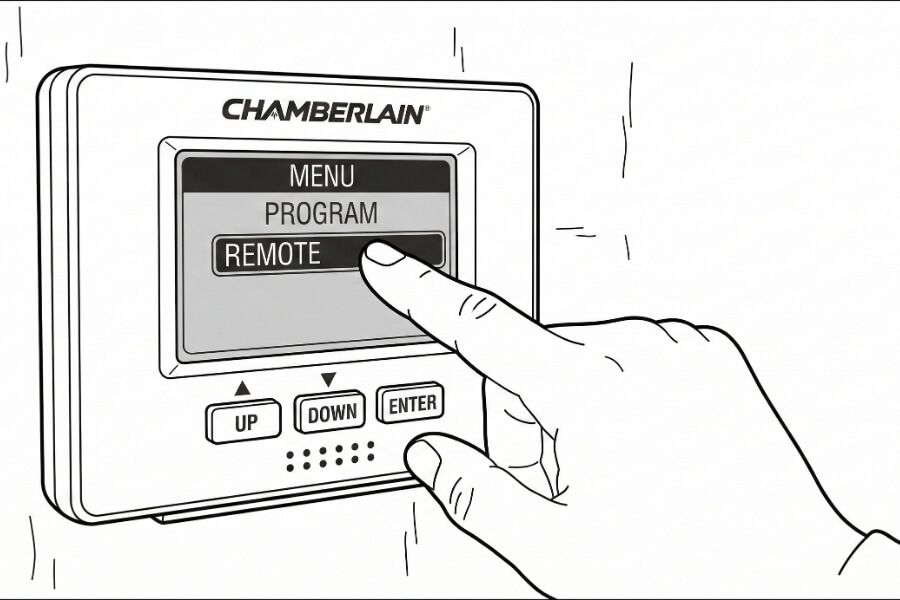
If your home features a modern wall-mounted Smart Control Panel, you can skip the ladder entirely. These digital screens allow you to initiate the pairing sequence from the safety of the ground, making it much easier to sync Chamberlain garage door opener accessories.
Navigate the menu on your wall panel to find the “Program” section. Select “Remote” and wait for the unit to beep. You then have the standard 30-second window to press the button on your new clicker to complete the link.
How do you Connect a Wireless Keypad to a Chamberlain Opener?
Adding a PIN pad is excellent for giving kids or neighbors access without needing a physical key. The steps for a wireless keypad setup are nearly identical to the remote process. If you want to sync Chamberlain garage door opener keypads, choose a 4-digit code that is easy for you to remember but difficult for others to guess.
- Quickly press and release the Learn button on the overhead motor.
- Walk to the exterior keypad mounted outside your garage.
- Enter your chosen 4-digit PIN within 30 seconds.
- Press and hold the “Enter” button until the motor lights flash.
Test the connection by waiting for the keypad backlight to turn off completely. Type in your code and hit enter to see if the door moves smoothly. For more technical details on how these signals travel, you can learn about radio frequency basics to understand why distance matters during setup.
Why is my Garage Door Remote not Syncing?
If the lights never flash when you attempt to sync Chamberlain garage door opener devices, the most common culprit is a dead battery. Even if the LED on your remote glows, it might lack the power to send a signal to the ceiling. Try a fresh coin-cell battery before assuming the hardware is broken.
Signal interference is another frequent issue that blocks a successful link. Large metal objects or certain LED light bulbs can “jam” the radio waves. If you continue to struggle, you can consult our Chamberlain error code guide for more advanced troubleshooting, or give us a call and we can help fix your garage door opener issue for you!
How do I Clear the Memory on my Garage Door Opener?
You should erase your motor’s memory if you recently moved into a new home or if a remote was stolen from your car. This process wipes all existing remotes and keypads for your security. You will have to reprogram every device you still own after doing this.
To clear the memory, press and hold the Learn button for exactly six seconds. Do not let go until the small LED light next to the button turns off. Once that light vanishes, your motor will no longer respond to any previously programmed remotes.
Need Help With Your Chamberlain Garage Door System?
In summary, identifying your motor’s “Learn” button color is the crucial first step to ensuring you have compatible accessories. From there, using either the motor itself or a smart wall panel, you have a brief 30-second window to securely sync Chamberlain garage door opener remotes and keypads to your home.
Our team at Berintek Garage Doors understands that a broken garage door disrupts your entire day. If these steps do not solve your problem, the internal circuitry might have suffered a power surge. We can help you replace a logic board or upgrade your system to a modern, smartphone-compatible model. Reach out to Berintek Garage Doors today, and let our expert team fix your garage door issues in Orleans, Nepean, Ottawa and beyond!